CardJar for Loyalty Cards: What Changes When Your Cards Stay With You
What CardJar Is Designed to Keep Available
The central distinction is between having a card on your device and retrieving it from a service when you need it. CardJar says your cards are on your phone and their barcodes remain available at the till with or without a network connection. It describes itself as having no account, sign-up, email requirement, or server.
That makes an ordinary checkout interruption less consequential. If reception disappears in a store, the card does not need a successful connection just to appear. This is the practical meaning of CardJar’s offline claim; it is not a promise that every retailer will accept every barcode in every circumstance.
CardJar says it recognizes and names the retailer and supports QR, Aztec, Data Matrix, and common one-dimensional barcode formats. Those details matter when a collection contains different kinds of cards: the app is meant to hold scannable codes, not merely a list of retailer names.
Starting With a Card, Not an Account
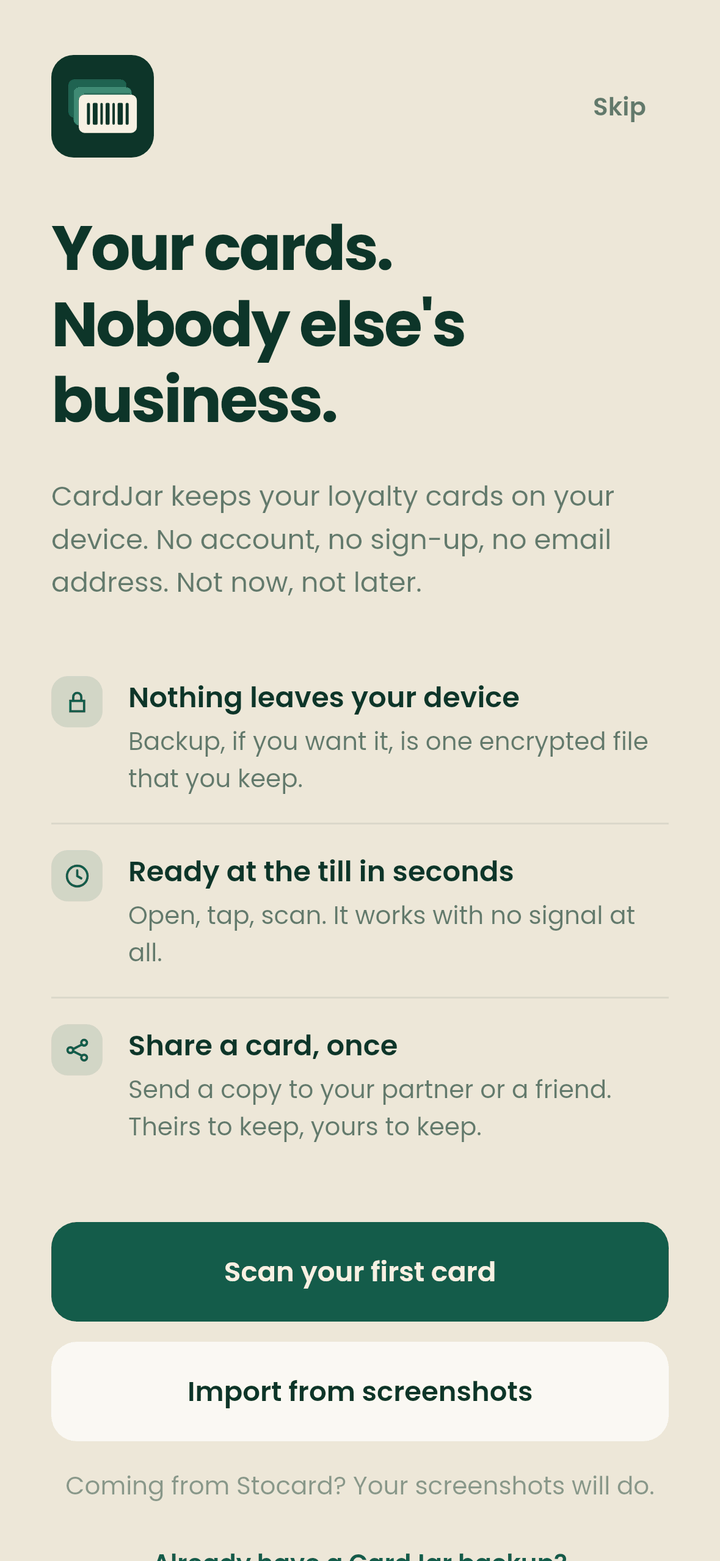
The public first-run screenshot offers a useful glimpse of the entry point. It presents actions to scan a first card or import from screenshots beneath the line “Your cards. Nobody else’s business.”
The asset demonstrates the available starting choices; it does not, by itself, demonstrate how well an import will work for any particular image.
A sensible first step is to add the card you use most, then check that its displayed code and retailer name match what you expect before relying on it in a queue. That check is recommended practice, not a claim that CardJar validates membership with the retailer.
For someone replacing a pocketful of cards, the useful decision is narrower than “Can I move everything at once?” Start with the formats and cards that matter at checkout. The documented scan and screenshot-import choices establish two ways to begin, but the supplied evidence does not establish a bulk-import process.
What Changes When the Phone Is Out of Reach
CardJar’s Wear OS feature description says a favorited card appears on the watch, which has an app and a tile. The watch holds its own copy of favorites, so a card remains available when the phone is in another room or out of range.
That is a distinct access path, not simply a smaller view of an open phone screen. If a frequently used supermarket card is among your favorites, the watch copy addresses the moment when reaching for the phone is inconvenient. The official description supports offline availability of those favorites; it does not specify a timing guarantee for changes made on the phone.
The distinction also helps set expectations: the watch claim concerns favorites, not an assertion that every card in the phone collection is always present on the watch. Favoriting the cards you actually present is therefore part of using this feature deliberately.
Sharing a Card Without Creating a Shared Account
CardJar says you can hand a card to someone in person without a network or contact details, and that the recipient gets a copy to keep. Think of that as transferring a usable copy, not inviting another person into a jointly managed CardJar account.
For an illustrative household example, one partner could give the other a copy of a card they both expect to present. The useful question before doing so belongs to the retailer: whether that membership permits another person to use it. CardJar’s sharing description establishes what the app offers, not the terms of any loyalty program.
This is also why “no server” should not be read as “no way to give someone a card.” CardJar describes deliberate, in-person sharing alongside local card access. Its statement that the app sends nothing anywhere describes its positioning; the available evidence does not spell out the technical method behind every exchange.
The Ownership Decision
The official product page says CardJar seals cards into one encrypted file protected by a passphrase you choose. That gives the passphrase a clear role in protecting the file. The supplied material does not establish a recovery service, an automatic backup, or a particular procedure for moving that file between phones, so none should be assumed when planning a device change.
CardJar is a strong fit to consider if the decision turns on three documented behaviors: opening a barcode without reception, keeping selected cards available on Wear OS, and giving another person a copy without exchanging contact details. Its first-run choices and encrypted-file description make it worth assessing as a personal card holder, while backup and retailer acceptance remain separate questions to resolve for your own cards. See CardJar’s product description for the documented scope.
Direct Sources
- CardJar official product page — account model, offline access, barcode formats, Wear OS, sharing, and encrypted-file description.
- CardJar first-run screenshot — visible scan and screenshot-import starting choices.